


SAVECALL explained for children
Sourcing Simplified. Lifecycle Managed.
What SAVECALL does, explained for a child
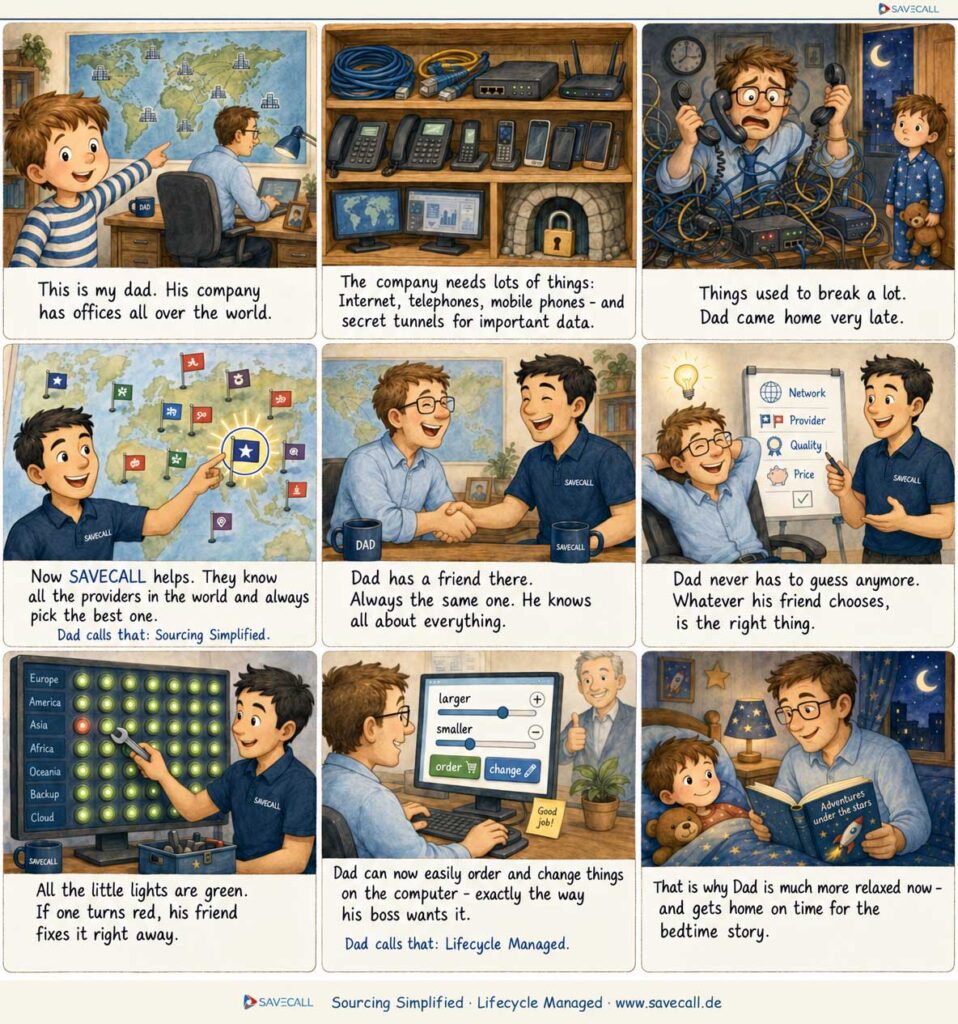
Every technical term, explained in one sentence
Every technical term you will come across with us is here, in one sentence of everyday language. If you want to go deeper, each entry leads to the detailed page.
Internet and access
Everything that gets your company onto the network.
| Term | Explained simply | |
|---|---|---|
| Bandwidth | Think of a road. Bandwidth is the number of lanes. On a wide road many cars get through at once, on a narrow one the traffic backs up. When everyone in the office is sitting in video calls and loading files at the same time, you need more lanes. | Basic term |
| DIA | Most companies share an internet line with their neighbors in the business park. When everyone there works at the same time, things get slow for you. With a dedicated line the full speed belongs to you around the clock, and the provider commits to it in writing. | Internet |
| Fiber | Instead of sending electricity through copper wire, light is sent through hair-thin strands of glass. Light is faster and loses almost no strength along the way. That is why the full speed still arrives even over long distances. | Fiber Access |
| Leased line | A line that runs permanently between two locations and belongs to nobody else. Like a private tunnel between two buildings. Because no one else drives through it, the speed is always the same, even at nine in the morning. | Leased Line |
| SDSL | Internet over the old copper cable of the phone line. What makes it special: uploading is just as fast as downloading. Important for companies that send large files or run their own server. | SDSL |
| Radio relay | Two antennas on two roofs send signals to each other, with no cable in the ground at all. You use this when digging would be too expensive or when civil works would take months. The one requirement is a clear line of sight between the two roofs. | Radio Relay |
| Dark fiber | You rent the bare fiber cable, with no equipment at either end. Like an empty pipe you get to blow through yourself, as hard as you like. Interesting for companies with their own network department, because the provider sets no speed limit. | Dark Fiber |
| Underlay | A corporate network has two layers: the physical line in the ground and the software above it that steers the traffic. The underlay is the line in the ground. Without it nothing runs, no matter how clever the software above it is. | Underlay |
| Submarine cable | Cables as thick as a thumb lie on the seabed between the continents. Almost all of the data traffic in the world runs over them, not over satellites. If one of them breaks, the connection to Asia or Africa gets noticeably slower. | Submarine Cable |
Telephony
How speech becomes data and turns back again.
| Term | Explained simply | |
|---|---|---|
| All-IP | Phone calls used to run over a dedicated phone line and the internet over a second one. Today there is only one line for both. The old phone connections have been switched off in Germany, which is why every company had to migrate. | All-IP |
| SIP trunk | The digital replacement for the old phone cable into the building. It connects your phone system to the public telephone network over the internet line. The key question: how many calls should be possible at the same time? | SIP Trunk |
| VoIP | Your voice is broken into small data packets, sent through the internet and put back together at the other end. It happens so fast that nobody notices. That is why calling with a headset on a laptop works just as well as on a desk phone. | VoIP Telephone System |
| Cloud phone system | The phone system used to be a gray box in the basement that somebody had to maintain. Today it sits in the data center of the provider and you use it over the internet. No device in the building, no maintenance, new employees are set up with a click. | Cloud Telephone System |
| UCaaS | Phone, video conferencing, chat and voicemail come from a single service instead of four programs. A chat can be turned into a video call mid-conversation without switching windows. You pay per employee per month. | UCaaS |
| Teams telephony | Out of the box, Microsoft Teams can only call colleagues who use Teams themselves. With a connection to the phone network your people dial any normal number straight from Teams and are reachable on the company number. The desk phone becomes redundant. | MS Teams |
| Operator Connect | A Microsoft-approved way to bring your phone numbers into Teams. The provider is selected directly in the Teams admin center, no equipment of your own is needed. Setup therefore takes days instead of weeks. | Operator Connect |
| PMX | A high-capacity connection for companies with a lot of call traffic. Instead of individual numbers you get a whole number block and many voice channels at once. Typical for hospitals, public authorities and call centers. | PMX |
| Virtual phone system | The phone system consists of nothing but software. Your number follows you to whichever device you are using, laptop, mobile or desk phone. Working from home, the same phone rings as in the office. | Virtual Telephone System |
Connecting sites
How several offices become one network.
| Term | Explained simply | |
|---|---|---|
| LAN | The network inside a single building. All the computers, printers and phones connected there by cable or Wi-Fi. It ends at the front door. | Basic term |
| WAN | As soon as a company has more than one building, the networks of its sites have to be connected with each other. That is exactly what a WAN is. It lets the branch in Hamburg work with the same files and programs as the head office in Munich. | WAN |
| MPLS | A private network run by the provider, separate from the public internet. Inside it your data gets a reserved lane with a guaranteed speed. Very reliable and priced accordingly, which is why many companies are now moving to SD-WAN. | MPLS |
| SD-WAN | All data used to take the same fixed route, even when it was congested. With SD-WAN, software decides continuously which route is currently the best. The phone call gets the stable line, the large update takes the cheap internet. The result: better quality at lower cost. | SD-WAN |
| VPN | An encrypted tunnel through the public internet. From the outside you can see that data is flowing, but not what is inside it. That way someone in a hotel works just as securely as at their desk in the office. | Ethernet VPN |
| Ethernet networking | Your sites are connected so that they behave like one single large office. The computer in Berlin uses the server in Cologne as if it stood next door. In between runs a dedicated line from the provider, not the public internet. | Ethernet Network |
| Point-to-point | A direct line between exactly two locations, with no detour and no other users, for example between production and the warehouse. Because nobody else is travelling on it, the delay always stays the same. | Point-to-Point |
| Direct Connect | Anyone who works a lot with the Amazon cloud notices that the speed fluctuates over the normal internet. Direct Connect is a dedicated line straight into the Amazon data center, bypassing the internet. Faster, more stable, and data transfer gets cheaper. | AWS Direct Connect |
| ExpressRoute | The same principle for Microsoft Azure and Microsoft 365. When Outlook and Teams have to run reliably for hundreds of employees, this dedicated line to Microsoft pays off. | Microsoft ExpressRoute |
Mobile
Everything to do with cards, devices and contracts.
| Term | Explained simply | |
|---|---|---|
| SIM card | The small chip that tells a device which contract and which number it belongs to. Without it no phone gets onto the mobile network. | SIM Card Management |
| eSIM | The same job, but built into the device instead of plugged in. The contract is loaded by software. Handy when travelling abroad, because a foreign tariff can be loaded without swapping plastic cards. | SIM Card Management |
| M2M SIM | A SIM card for machines instead of people. It sits in the elevator, the vending machine or the company car and reports data from there. It is built more robustly, withstands heat and cold and often stays installed for ten years. | M2M SIM Cards |
| IoT | Devices that send data on their own, without anyone operating them. The container reports its location, the sensor reports the temperature in the cold store. For this to work, each of these devices needs its own connection to the network. | IoT Connect |
| MDM | If you hand out a hundred company phones, you cannot set them up one by one. This software manages all of them centrally: distributing apps, setting security rules and wiping a lost device remotely. | Mobile Device Management |
| DaaS | Devices are rented instead of bought. You pay monthly per device and get a replacement when one breaks, repairs and new hardware after a few years. No large one-off purchase and no old devices sitting in a cupboard. | Device as a Service |
| LCM | A company phone goes through a cycle: buy, set up, hand out, repair, take back, wipe the data, sell. Lifecycle management means that somebody looks after this whole cycle and not just the purchase. | Lifecycle Management |
| TEM | Large companies receive monthly invoices from several providers with hundreds of line items. Nobody checks them in detail. With telecom expense management somebody does exactly that, systematically, and finds cards that nobody has used for ages or tariffs that do not match actual usage. | Telecom Expense Management |
| 2G sunset | The oldest mobile network is being switched off. Phones are not affected, but many machines still transmit over it: elevator emergency calls, alarm systems, meters. These devices need new technology in good time, otherwise one day they will simply be offline. | 2G Sunset |
Security
What protects your network from attacks and outages.
| Term | Explained simply | |
|---|---|---|
| Firewall | The bouncer between your network and the internet. It checks every connection that wants to come in or go out and only lets through what is on the guest list. Everything else is turned away. | Basic term |
| Zero Trust | The old rule was: once you are inside the corporate network, you may do anything. That becomes dangerous the moment an attacker has made it in. Zero trust means that every single access is checked again, every time, whether it comes from inside or from outside. | Zero Trust |
| SASE | Employees work everywhere and the data sits in the cloud. Routing all the traffic to head office first and through the firewall there is a detour. With SASE, network and protection sit together in the cloud, right where the employee happens to be. | SASE |
| DDoS | An attack in which thousands of remotely controlled computers call up your website at the same time. Not to break in, but to clog the line until no real customer gets through any more. Protection means sorting out this junk traffic before it reaches you. | DDoS Protection |
| XDR | Attackers hide among normal activity, so a single event never stands out. This software watches laptops, servers, mail and the network at the same time and recognizes patterns. Anything suspicious is reported and, in an emergency, stopped automatically. | XDR |
| Penetration test | Security specialists attack your network with your written permission, exactly the way real attackers would. Afterwards you get a report on every gap they found. Better that somebody finds them on your behalf than somebody else does. | Penetration Test |
| Vulnerability scan | A program automatically searches your systems for known security gaps, such as outdated software. It runs regularly and without specialists. The difference to a penetration test: here a machine looks for the known, there a person looks for the new. | Vulnerability Scan |
| Anomaly detection | Over a period of weeks the system learns what is normal in your network. If a computer suddenly sends large amounts of data out at night, that stands out immediately. This is how you spot attacks for which no known description exists yet. | Anomaly Detection |
| Mobile Security | Phones and tablets leave the office, connect to unknown Wi-Fi networks and get lost. This protection makes sure that company data on the device is encrypted, that dangerous apps are blocked and that a lost device can be wiped remotely. | Mobile Security |
Workplace and cloud
Where your programs and data actually sit.
| Term | Explained simply | |
|---|---|---|
| Cloud | Programs and data no longer sit on a server in your own building but in the data center of a provider. You access them over the internet. You pay for what you use, you do not deal with hardware and you can reach everything from anywhere. | Cloud IT |
| Microsoft 365 | The package of Outlook, Word, Excel, Teams and online storage, paid per employee per month. The programs update themselves and the files live online, so several people can work on them at the same time. | Microsoft 365 |
| License | The right to use a piece of software, usually per person per month. The most common mistake in companies: larger packages are paid for than necessary, and the licenses of employees who have left keep running for years. | License Optimization |
| Modern Workplace | The idea that the workplace is not stuck to a desk. The same access to files, phone and programs in the office, at home and on the road, everywhere with the same security rules. | Modern Workplace |
| Hosting | A provider runs your servers in its data center and takes care of power, cooling, internet and the replacement of faulty parts. Control over the software stays with you, worrying about the hardware does not. | Hosting |
| Data center | A secured building full of servers, with backup power, air conditioning, fire protection and access control. It is built so that the equipment keeps running even during a power cut or a fire. | Data Center |
| Dedicated Cloud Access | A dedicated line into the cloud instead of the route over the open internet. Worthwhile when applications run there that nobody in the building can work without. | Dedicated Cloud |
| Emergency workstation | A prepared workplace outside your building, for the case that your office becomes unusable, for example after water damage. Equipment, phone and access are ready so that work can continue the same day. | Emergency Workstation |
Consulting and procurement
The terms that show up in the quote and in the contract.
| Term | Explained simply | |
|---|---|---|
| Carrier | The company that actually owns the lines, for example Telekom, Vodafone or Colt. They build and operate the networks. Different carriers are strong in different countries, so the best provider in Germany is not automatically the best one in Brazil. | Our Carriers |
| Provider | The company you buy from. That can be the network operator itself or somebody who resells its lines. What counts for you is who holds the contract and who you call when there is a fault. | Basic term |
| SLA | The written commitment on how reliably a service runs: how many hours a year it may be down and how quickly a fault has to be fixed. Without an SLA there is no promise, only hope. This is exactly where cheap and expensive offers differ. | Basic term |
| Tender | You describe once, precisely, what you need, and several providers submit their offer on that basis. Because everyone gets the same template, the answers are comparable. Without it you are comparing apples with oranges. | Invitation to Tender |
| Contract management | The overview of which contracts are running, what they cost, when they end and by when notice has to be given. Without that overview, contracts renew on their own, often straight away for another year. | Contract Management |
| Procurement pool | Several companies combine their purchasing and appear together as one large customer. That way a mid-sized company also gets prices that otherwise only corporations see. | Procurement Pool |
| Migration | The move from one provider or one technology to the next. The art of it is that nobody is left without a phone or without internet while it happens. That is why sites are switched over one at a time, often at night or at the weekend. | WAN Consulting |
| Cost reduction | Telecommunications contracts often run on unchanged for years while market prices fall. Comparing existing contracts with what is possible today therefore almost always pays off. | Cut Costs |
Keeping track
How you get to see what you actually have.
| Term | Explained simply | |
|---|---|---|
| Connectivity Dashboard | One screen that shows all your sites and lines at the same time. Green means it is running. Red means there is a problem there, and you see it before the first employee picks up the phone. | Connectivity Dashboard |
| Mobile dashboard | The same overview for mobile: which cards are active, who uses how much data, which devices are in circulation and what all of it costs together. | Mobile Dashboard |
| SAVECALL on Demand | Services you book at short notice instead of paying for them permanently in the contract. For example an engineer for an office move or extra bandwidth for a trade fair week. | SAVECALL on Demand |
| Inventory | The complete list of all connections, contracts, SIM cards and devices a company has. It sounds obvious, but it rarely exists. Almost every cost reduction starts with this list being drawn up for the first time. | Basic term |
| Ticket | A recorded fault report with its own number. That way it does not get lost in emails but stays traceable until it is resolved. You can see at any time who is working on it. | Basic term |
| Smart IT | Ongoing support for your IT from a fixed team that knows your environment. Instead of looking for a new service provider for every problem, you always call the same number. | Smart IT |
You do not need to know the terms

That is what you have us for
Nobody should have to learn network technology on top of their actual job. That is what we have been here for since 1997. You tell us what your company needs. We translate that into technology, gather the offers and stay your fixed point of contact afterwards. In the end it comes down to exactly what the child describes above: that you no longer have to think about your lines in the evening.
- No call at six: if a line goes down in Singapore, we usually know before you do.
- No silent renewal: somebody here keeps an eye on the notice period, even after three years.
- No surprises on the invoice: every line item is checked against the contract.
- No hunting for the number: you always call the same person, not a rotating hotline.
Awards for Outstanding Performance









Frequently asked questions about telecommunications terms
A LAN is the network inside a single building, a WAN connects several sites with each other. As soon as your company has more than one site, you need a WAN. What that connection looks like technically is decided between MPLS, SD-WAN and Ethernet networking.
With SD-WAN, software decides continuously which route your data takes. That route used to be hard-wired, today it is chosen according to load and importance. The phone call gets the stable line, the large update takes the cheap internet.
A carrier is a network operator, in other words the company that actually owns the line. Telekom, Vodafone and Colt are carriers. SAVECALL is not a carrier itself but works with more than 80 of them and picks the right one for each site.
All-IP describes the situation: telephony now runs over the data line instead of over a separate phone line. The SIP trunk is the specific product your phone system uses to run on that data line. All-IP is the principle, the SIP trunk is the means.
Sourcing Simplified means: you ask once and receive comparable offers instead of twenty separate conversations. Lifecycle Managed means: after signing, the same contact stays responsible for contracts, faults and renewals. Together the two sentences describe what SAVECALL does every day.
The first conversation and the analysis of your existing contracts are free of charge. We are paid by the network operators and not through a consulting fee. That way you get an assessment of your running costs without signing anything first.
ONE Contact. ALL Carriers.


+FAQ
You ask.
